
Article Categories
- Baldur's Gate 3
- Diablo
- Elder Scrolls
- General
- Hogwarts Legacy
- League of Legends
- Minecraft
- Pokemon Go
- Sims 4
- StarCraft
- Steam Platform
- Xbox Game Console
More Articles
Getting Rich Off Paintings
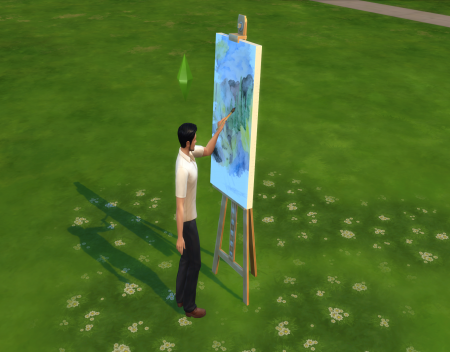
The biggest mistake you can make in the Sims 4 is wasting your character’s life by making him work in some crappy job. Being the average Joe is tedious and would take a considerable amount of effort just to earn a steady paycheck. Just like in real life, your Sim has to constantly worry about their job performance or they’ll risk getting demoted or even fired. Of course, you could use cheat codes to support yourself, but that would just make you a loser. What if I told you that your Sim can make some serious cash with just the swipe of a paintbrush? Today we’ll be going over how to get rich off paintings in the Sims 4.
Getting Started
Traits play an important role in this process. None of these suggestions are mandatory but they’ll definitely make a painter’s life easier. First, there’s the “Art Lover” trait, which will give Sims powerful moodlets when they finish a painting. Your character will also get art-related whims that are relatively easy to complete, giving you plenty of satisfaction points to trade for useful rewards. There’s also the “Creative” trait, which will allow your Sim to gain an inspiration moodlet from time to time. They’ll also gain fun from painting, meaning that you won’t have to worry about your Sim getting tense due to lack of entertainment. If you want to focus entirely on increasing your wealth, you can also get the “Loner” trait, in which your Sim won’t require any social interaction whatsoever. After you finish customizing your Sim, choose a lot and then build your crappy starter house. Just make sure you have a small room with an easel in it and you’re good to go.
Pocket Change
The first thing you should do is start the Painter career. Yes, I know. You only have to work there until you reach level 3, where you get “Study of the Human Form” as a reward. After receiving this item, you can quit your job. Hang it in the same room as the easel and enable its emotional aura. This allows any nearby Sims to gain an inspired moodlet indefinitely, which increases the quality of their creations and builds up their skill level faster. You’re going to want to start with the Painter Extraordinaire aspiration, which allows you to rack up satisfaction points quickly. The tasks in this aspiration are quite simple and most of them can be accomplished just by painting on the easel. Until your Sim achieves a level 10 painting skill, I recommend you focus on classical paintings. They’ll help you pay the bills and make upgrades to your house along the way. When you reach max level in painting, the paint from reference paintings will usually be worth 1,000 simoleons or more. That alone can bring your Sim a substantial income over time. Now, let’s take the next step.
Digital Sketchpad
After completing the Painter Extraordinaire aspiration along with some art related whims, you should have a substantial amount of satisfaction points. The first thing you’ll want to buy is the Marketable trait, which will increase the value of your Sim’s paintings. It can go anywhere from 10% to triple the usual value, but averages out at double. This will cost you 1,500 points. And then there’s the Creative Visionary trait, which will increase your Sim’s chances of painting masterpieces by 20%. Masterpieces can sell for a lot more than normal paintings. These two traits work marvelously with the Digital Sketchpad. It’s a device that can be carried around by your Sim anywhere that allows you to make any painting you could create on the easel. Except, it’s significantly faster. This basically allows you to mass produce paintings and sell them for an absurd amount of money. With the handiness skill, you can even upgrade it to make the painting process even quicker. At this stage, I recommend abstract paintings, they netted me the most profits out of any paintings I’ve seen. Just queue up a bunch of paintings at the sketchpad and sit back and watch. Stacks of these paintings can be sold for 10s of thousands of simoleons.
Repeat this step multiple times and you’ll be filthy rich in no time.
The biggest mistake you can make in the Sims 4 is wasting your character’s life by making him work in some crappy job. Being the average Joe is tedious and would take a considerable amount of effort just to earn a steady paycheck. Just like in real life, your Sim has to constantly worry about their job performance or they’ll risk getting demoted or even fired. Of course, you could use cheat codes to support yourself, but that would just make you a loser. What if I told you that your Sim can make some serious cash with just the swipe of a paintbrush? Today we’ll be going over how to get rich off paintings in the Sims 4.
Getting Started
Traits play an important role in this process. None of these suggestions are mandatory but they’ll definitely make a painter’s life easier. First, there’s the “Art Lover” trait, which will give Sims powerful moodlets when they finish a painting. Your character will also get art-related whims that are relatively easy to complete, giving you plenty of satisfaction points to trade for useful rewards. There’s also the “Creative” trait, which will allow your Sim to gain an inspiration moodlet from time to time. They’ll also gain fun from painting, meaning that you won’t have to worry about your Sim getting tense due to lack of entertainment. If you want to focus entirely on increasing your wealth, you can also get the “Loner” trait, in which your Sim won’t require any social interaction whatsoever. After you finish customizing your Sim, choose a lot and then build your crappy starter house. Just make sure you have a small room with an easel in it and you’re good to go.
Pocket Change
The first thing you should do is start the Painter career. Yes, I know. You only have to work there until you reach level 3, where you get “Study of the Human Form” as a reward. After receiving this item, you can quit your job. Hang it in the same room as the easel and enable its emotional aura. This allows any nearby Sims to gain an inspired moodlet indefinitely, which increases the quality of their creations and builds up their skill level faster. You’re going to want to start with the Painter Extraordinaire aspiration, which allows you to rack up satisfaction points quickly. The tasks in this aspiration are quite simple and most of them can be accomplished just by painting on the easel. Until your Sim achieves a level 10 painting skill, I recommend you focus on classical paintings. They’ll help you pay the bills and make upgrades to your house along the way. When you reach max level in painting, the paint from reference paintings will usually be worth 1,000 simoleons or more. That alone can bring your Sim a substantial income over time. Now, let’s take the next step.
Digital Sketchpad
After completing the Painter Extraordinaire aspiration along with some art related whims, you should have a substantial amount of satisfaction points. The first thing you’ll want to buy is the Marketable trait, which will increase the value of your Sim’s paintings. It can go anywhere from 10% to triple the usual value, but averages out at double. This will cost you 1,500 points. And then there’s the Creative Visionary trait, which will increase your Sim’s chances of painting masterpieces by 20%. Masterpieces can sell for a lot more than normal paintings. These two traits work marvelously with the Digital Sketchpad. It’s a device that can be carried around by your Sim anywhere that allows you to make any painting you could create on the easel. Except, it’s significantly faster. This basically allows you to mass produce paintings and sell them for an absurd amount of money. With the handiness skill, you can even upgrade it to make the painting process even quicker. At this stage, I recommend abstract paintings, they netted me the most profits out of any paintings I’ve seen. Just queue up a bunch of paintings at the sketchpad and sit back and watch. Stacks of these paintings can be sold for 10s of thousands of simoleons.
Repeat this step multiple times and you’ll be filthy rich in no time.
Does boss difficulty change depending on the floor?
What is the meaning of the small pink face symbol on the Pokemon summary screen?

What Hogwarts tips do you wish you'd known when you started?
My new shop in Hogwarts Legacy

In PUBG, Where are all the underground bunkers?

What is a good road layout when starting up a Sim City?
Can you swim underwater in Hogwarts Legacy?

Is there a limit to common boons, and what happens if you reach it?
OpenTTD: Invading a city to get a rail line through it
Does over-completing challenges earn extra XP in Mario Golf GBC?