
Article Categories
- Baldur's Gate 3
- Diablo
- Elder Scrolls
- General
- Hogwarts Legacy
- League of Legends
- Minecraft
- Pokemon Go
- Sims 4
- StarCraft
- Steam Platform
- Xbox Game Console
More Articles
Can two players play a multiplayer game for Game Boy Advance using only one cartridge?
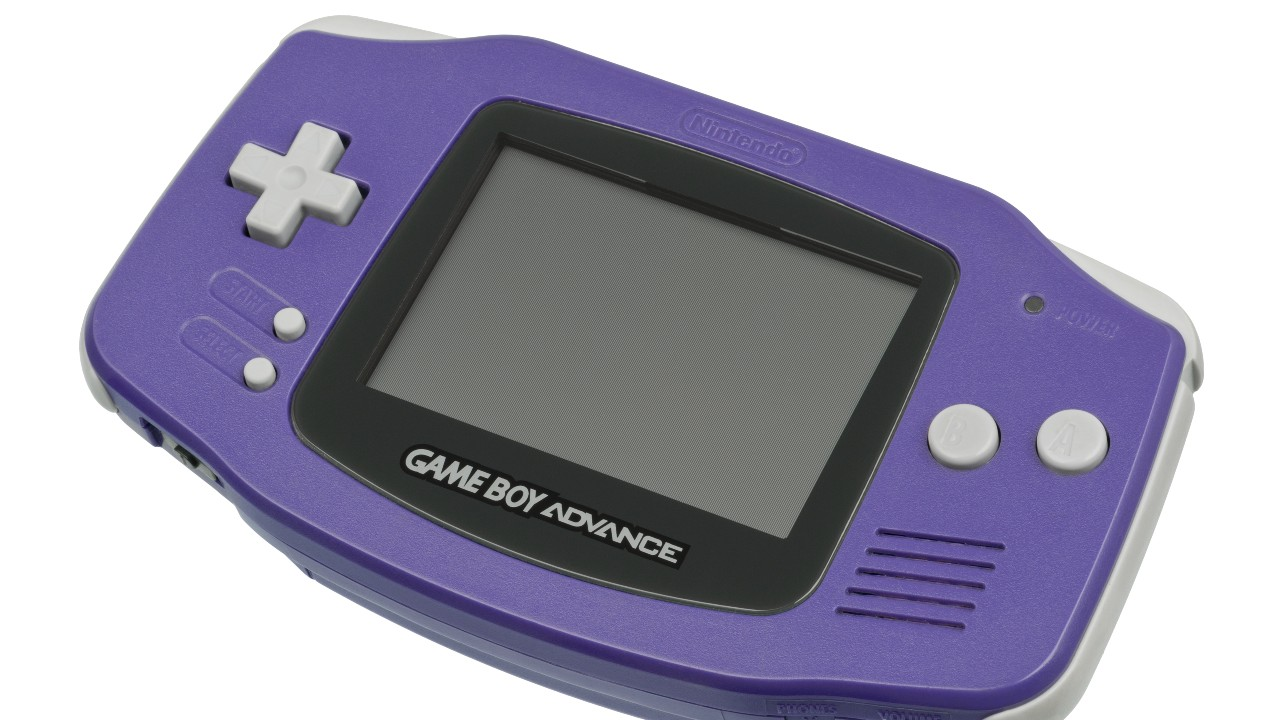
I have two Game Boy Advance units, each with a wireless link accessory. I also have only one copy of The Chronicles of Narnia: The Lion, The Witch, And The Wardrobe. I have tried to connect both units by hosting one with the cartridge, and searching with the one without the same cartridge inserted, but it didn't work. I have not seen in the manual if this works. Does this just take a while, or does it just not work at all?
Question from user user128965 at gaming.stackexchange.com.
Answer:
To start with, while most GBA games do require a second Game Pak in order to play multi-player, Nintendo included support for what they called "Single-Pak Linking" onto the Game Boy Advanced and SP. (Also know as "Multi-Boot" in development circles based on some of the research for this question.) In order for this feature to work, the game in the host GBA needs to support the Single-Pak functionality.
Amusing that the host as one of these games, the steps required to make this work is the following:
Have all the GBA/SP/Micro systems turned off.
Insert the Game-Pak into the host.
Plug the Link Cables into the host and each of the guest systems. (The cable has a purple end and gray end, with Purple being the host.).
(Follow the instructions included with the game at this point) Usually, at this point you turn all the GBA/SP/Micro systems on at the same time. Some games might require you to hold "START" and "SELECT" on the guest systems, while others will just work.
Instructions pulled from Nintendo's website, using a Micro as a host.
From there, the host system needs to access the "multiplayer option", which should start the process of rebooting/transferring the game onto the guest systems.
Some of the possible problems here:
Based on the provided information, there are two possible issues happening right now: The first issue is that the Wireless Accessory does not work on any game, but rather the game would need to see/communicate with the device.
A major drawback of the Game Boy Advance Wireless Adapter is that it is not backwards compatible; that is, it will only work with games that have been programmed to support the wireless adapter, excluding all older model Game Boy games. As of July 2009, only about 30 Game Boy Advance games support the wireless adapter, and many of the few supported games are the bit Generations series (Japan only) and the Classic NES Series.
In the list of provided games, I didn't see Chronicles in it. It's possible that Chronicles does work, but there's little evidence of this right now.
The second possibility is that Single-Pak Linking isn't supported by the game. Based on a substantial list of games that support Single-Pak Linking, it does not seem like Chronicles shows up here as well. (Same idea, it does not prove that this game doesn't support Single-Pak Linking, but there's very little evidence if this is even an option for that game in particular.).
Note 1: (Nintendo created a logo for publishers to add to boxes if this feature was supported, but looking as most of the box art, it seems there are only a handful of games that actually used it.).
Note 2: There were some "wireless" devices created before the official one from Nintendo, but they seem to be a link cable with RF or some other wireless tech as a bridge.
Answer from user NBN-Alex at gaming.stackexchange.com.
I have two Game Boy Advance units, each with a wireless link accessory. I also have only one copy of The Chronicles of Narnia: The Lion, The Witch, And The Wardrobe. I have tried to connect both units by hosting one with the cartridge, and searching with the one without the same cartridge inserted, but it didn't work. I have not seen in the manual if this works. Does this just take a while, or does it just not work at all?
Question from user user128965 at gaming.stackexchange.com.
Answer:
To start with, while most GBA games do require a second Game Pak in order to play multi-player, Nintendo included support for what they called "Single-Pak Linking" onto the Game Boy Advanced and SP. (Also know as "Multi-Boot" in development circles based on some of the research for this question.) In order for this feature to work, the game in the host GBA needs to support the Single-Pak functionality.
Amusing that the host as one of these games, the steps required to make this work is the following:
Have all the GBA/SP/Micro systems turned off.
Insert the Game-Pak into the host.
Plug the Link Cables into the host and each of the guest systems. (The cable has a purple end and gray end, with Purple being the host.).
(Follow the instructions included with the game at this point) Usually, at this point you turn all the GBA/SP/Micro systems on at the same time. Some games might require you to hold "START" and "SELECT" on the guest systems, while others will just work.
Instructions pulled from Nintendo's website, using a Micro as a host.
From there, the host system needs to access the "multiplayer option", which should start the process of rebooting/transferring the game onto the guest systems.
Some of the possible problems here:
Based on the provided information, there are two possible issues happening right now: The first issue is that the Wireless Accessory does not work on any game, but rather the game would need to see/communicate with the device.
A major drawback of the Game Boy Advance Wireless Adapter is that it is not backwards compatible; that is, it will only work with games that have been programmed to support the wireless adapter, excluding all older model Game Boy games. As of July 2009, only about 30 Game Boy Advance games support the wireless adapter, and many of the few supported games are the bit Generations series (Japan only) and the Classic NES Series.
In the list of provided games, I didn't see Chronicles in it. It's possible that Chronicles does work, but there's little evidence of this right now.
The second possibility is that Single-Pak Linking isn't supported by the game. Based on a substantial list of games that support Single-Pak Linking, it does not seem like Chronicles shows up here as well. (Same idea, it does not prove that this game doesn't support Single-Pak Linking, but there's very little evidence if this is even an option for that game in particular.).
Note 1: (Nintendo created a logo for publishers to add to boxes if this feature was supported, but looking as most of the box art, it seems there are only a handful of games that actually used it.).
Note 2: There were some "wireless" devices created before the official one from Nintendo, but they seem to be a link cable with RF or some other wireless tech as a bridge.
Answer from user NBN-Alex at gaming.stackexchange.com.
What do the numbers next to the achievements mean in Overwatch?
I wish we couldn't accidentally hurt Hogwarts Legacy beasts
I bought Hogwarts Legacy and wow it’s a solid game but the nostalgia is crazy
How do I climb tall vertical shafts in Dead Cells?
How can two squads of COD friends join the same DMZ instance?
Why is the fishing rod so helpful for PvP in old combat?
How to get the Steam Workshop to work with Civilization V for a Mac?
What blocks Barbarian spell casting?
What are the black bugs that come from defeated enemies?
Does the solution to The Shoe Store Thief include the price of the shoes?